
Forum Replies Created
-
AuthorPosts
-
admin
KeymasterThe following function is also used by PayPal and Braintree gateways. Don’t modify it with Stripe specific things (then our PayPal users will start to complain):
swpm_handle_subsc_cancel_stand_aloneThings are done in our plugin keeping in mind that we want to keep this plugin as lightweight and simple as possible. We don’t want to capture too much data that is already captured and available in the merchant’s Stripe or the PayPal account. A user can search within the Stripe or PayPal account to find additional details.
Please tell me the following only so I can reproduce the issue on my site. Then I will know if our plugin can handle that or not. If I cannot reproduce the issue, I can’t get the full picture.
– What is the use case?
– What action I need to do with my subscription payment (in stripe account) to generate the event?
– What parameters are being used in the payment button?
– What version of Stripe API are you using? Depending on the API version, Stripe will send different data to the webhook.
– When a subscription is cancelled, it will cancel the corresponding account. I have tested this just now and it works. On your site it can fail due to many other factors.
– When a refund is issued (partial or full), thecharge.refundedwebhook should be triggered (which the plugin will handle).
– Stripes webhook sends many events. We only handle a limited number of them. That’s intentional (in the context of keeping the plugin’s operation simple to make sure we can maintain it in the future). This is why the exact use case is very important. When I can reproduce the exact condition on my site, I will be able to assess things better.KeymasterThe fields need to be viewed on the site. Site Admins can view the custom fields from the members menu of your dashboard. The individual members can view and edit their full profile from the “Edit Profile” page.
You can use the following email merge tag that will include all the custom field values in the email (maybe useful for site admin to have a quick glance at the raw values).
{raw_custom_fields}
KeymasterYes, those are the only Stripe options within our plugin.
As an alternative, you can try the following Stripe plugin integration (which has a payment popup implementation that is also SCA compatible):
https://simple-membership-plugin.com/stripe-payments-plugin-integration-for-membership-payment/We use the Standard Stripe checkout option in our plugin. The ongoing API related code maintenance required for the other Stripe implementation is beyond the scope of our simple plugin at this stage. The following page will offer some explanation regarding our resource limitation:
https://simple-membership-plugin.com/message-from-the-simple-membership-team/KeymasterYou already asked this question via email where we have given you a reply. The individual custom fields are not shown in the email. They are visible on the website via the plugin’s interface. The following page explains exactly what is available in the form builder addon:
https://simple-membership-plugin.com/simple-membership-form-builder-addon/
KeymasterThank you. Some points:
– You are looking at the “swpm-stripe-subscription-ipn.php” file which has been deprecated by Stripe. Stripe is forcing everyone to use the SCA compatible option. So you need to make sure that you are using the following documentation:
https://simple-membership-plugin.com/sca-compliant-stripe-subscription-button/Then you can look at the “swpm-stripe-sca-subscription-ipn.php” file.
The old stripe buttons are no longer supported by Stripe. Stripe made this decision. So the code for it will be deleted in a future version.
– There is a history for how things evolved with the subscription payments. Originally the subscription payment wasn’t available so we later made changes to incorporate it. There is legacy stuff there for backwards compatibility. Those are needed to make sure thousands of other sites doesn’t break suddenly after an upgrade.
– In certain cases the charge ID is used as subscriber_id (due to the history of the plugin’s evolution). So in certain cases, it’s okay.
– Please tell us the use case (as advertised by our plugin) and which steps are breaking. For example: how we can reproduce the issue. That way, we can look at the code (keeping in mind our own evolution of the code) and we can investigate it better in terms of what can be changed without impacting thousands of other users.
– Our code is definitely not perfect. We do have limitation of resources so for certain projects, our simple plugin is not a good fit for the project in question. Please read the following post which has some explanation:
https://simple-membership-plugin.com/message-from-the-simple-membership-team/– I totally agree that we can add more details to the $ipn_data array. This shouldn’t impact anything else. So we can do that for sure. But first, check the “swpm-stripe-sca-subscription-ipn.php” file which does contain the subscriber ID, and then you can see if the additional data is still needed.
January 11, 2022 at 6:39 am in reply to: Members who renew before they expire are being switched to "inactive" #23471KeymasterThere is no simple answer for this unfortunately since the issue is specific to your setup on this site. The details in the debug log file should be useful to troubleshoot it. So you can try Enabling the debug logging feature and check the log file which should have some information as to why it is doing that.
https://simple-membership-plugin.com/enable-debug-logging/We won’t know what’s happening on the site unless we can see log files and more details about the particular setup of this site. Also, need to make sure that there is no conflict happening on this site. A paid support ticket will be required if you want us to investigate this.
https://simple-membership-plugin.com/paid-support-simple-membership-plugin/KeymasterThis looks like a page caching related issue. The membership functionality needs a dynamic page being shown to the members. A cached page simply shows a static cached page (our plugin doesn’t get a chance to apply the conditions to that page). When a cached page is being shown, the user is not actually being shown a page which can read the login status of the user then show/hide the page’s content accordingly. That’s what causes the issue with membership type setup.
Ask your hosting provider if they are applying caching to your site. Also, if you are using any of the following plugins, then there is some instructions on how to set them up:
WP Super Cache
https://simple-membership-plugin.com/wp-super-cache-compatibility-simple-membership/W3 Total Cache
https://simple-membership-plugin.com/w3-total-cache-compatibility-simple-membership/WP Rocket Cache
https://simple-membership-plugin.com/wp-rocket-cache-compatibility-for-simple-membership/WP Fastest Cache
https://simple-membership-plugin.com/wp-fastest-cache-compatibility-for-simple-membership/KeymasterThe character encoding for the item name and some other details in the data looks to be incorrect. Please make sure to enable the UTF-8 formatting for your PayPal IPN message. So Non-English characters can be recognized correctly by the plugin:
https://simple-membership-plugin.com/setting-utf-8-formatting-for-your-paypal-ipn-messages/Let us know if that helps.
KeymasterThat looks to be coming from your browser’s password remembering system. That does not come from our plugin. That plugin doesn’t have any capability to do that.
Empty your browser’s cache and tell it to forget all the stored password then check it. Alternatively, you can download a completely different browser (example: Firefox or Chrome) and test the page with that browser.
KeymasterThe
swpm_restricted_more_tag_msgfilter is triggered for that message. So you should be able to use this filter to specify your custom HTML content that you want to output for it. The following is just an example code to show how this filter can be used in your custom code:add_filter('swpm_restricted_more_tag_msg', 'custom_restricted_more_tag_msg'); function custom_restricted_more_tag_msg ( $output ){ $output .= "My custom more tag message test"; return $output; }KeymasterThese messages will strip certain HTML characters when the sanitization function is called (this done for security). So this is something you may be able to do by using the filter hook and custom code on your site.
Please give me an example of which message you want to customize and what is the HTML that you want to use so I can check it.
KeymasterWe use an external validation library that handles the JavaScript error messages. I don’t have any suggestion for this unfortunately. Since this theme is conflicting with our plugin, the best option is to look for a different plugin that doesn’t conflict with the theme you are using.
KeymasterWe use the standard/simple paypal subscriptions payment option in our plugin. So it won’t be possible to add a lot of bells and whistles to that implementation.
In the future we will try to add another PayPal API options to offer more options.
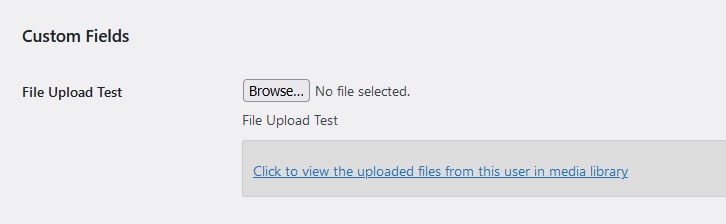
December 8, 2021 at 6:23 am in reply to: How to fetch upload attachments data in admin section with member detail? #23357KeymasterThe files are uploaded to the media library. So you can view it from the admin dashboard of your WordPress install. When you are editing the member’s profile, you can click on a link that shows all the files uploaded by that member. See the following screenshot for reference:
 Keymaster
This is most likely a theme related issue so do the following test:
https://simple-membership-plugin.com/forums/topic/test-for-plugin-and-theme-conflict-before-posting-an-issue-or-a-bug/By default the post will be protected everywhere (when you protect it). Some themes will show an EXCERPT instead of the actual post content. So for example, some themes will show an excerpt on the blog posts listing page which will create the issue you explained.
If your theme has an option to show full text instead of excerpt, then try that option to see if that works better.
Also, Go to the following settings of WordPress and select the
Full Textoption to see if that helps:WordPress General Settings -> Reading -> For each post in a feed, include -
AuthorPosts