
Forum Replies Created
-
AuthorPosts
-
GreenBandana
ParticipantThanks for clarifying!
ParticipantThanks for the responses!
1. We are using the SCA compliant Stripe buttons.
2. Here are all the events the webhook is listening for (40 total); the only new one I added today is “invoice.paid”. Unless I’m misunderstanding, there doesn’t appear to be only one “Customer” or “Charge” webhook.
charge.captured
charge.dispute.closed
charge.dispute.created
charge.dispute.funds_reinstated
charge.dispute.funds_withdrawn
charge.dispute.updated
charge.expired
charge.failed
charge.pending
charge.refund.updated
charge.refunded
charge.succeeded
charge.updated
customer.bank_account.created
customer.bank_account.deleted
customer.bank_account.updated
customer.card.created
customer.card.deleted
customer.card.updated
customer.created
customer.deleted
customer.discount.created
customer.discount.deleted
customer.discount.updated
customer.source.created
customer.source.deleted
customer.source.expiring
customer.source.updated
customer.subscription.created
customer.subscription.deleted
customer.subscription.pending_update_applied
customer.subscription.pending_update_expired
customer.subscription.trial_will_end
customer.subscription.updated
customer.tax_id.created
customer.tax_id.deleted
customer.tax_id.updated
customer.updated
invoice.paid
invoice.payment_succeeded3. Understood
4. Yes, all levels are set to expire after 1 year
5. We’ve now enabled debug and will send along any reports generated.
ParticipantThanks. Since my post references another one with the same issue (from 1+ year ago), was there a fix found previously?
ParticipantWe have found this same behavior – for however many times Stripe attempts the credit card, the user’s account is extended one subscription period.
So if the credit card has changed and the card is tried 3 times before failing, the user’s subscription (in our case) is extended 3 years without any payment.
Is there any update here? We’re using 4.1.0. Thank you!
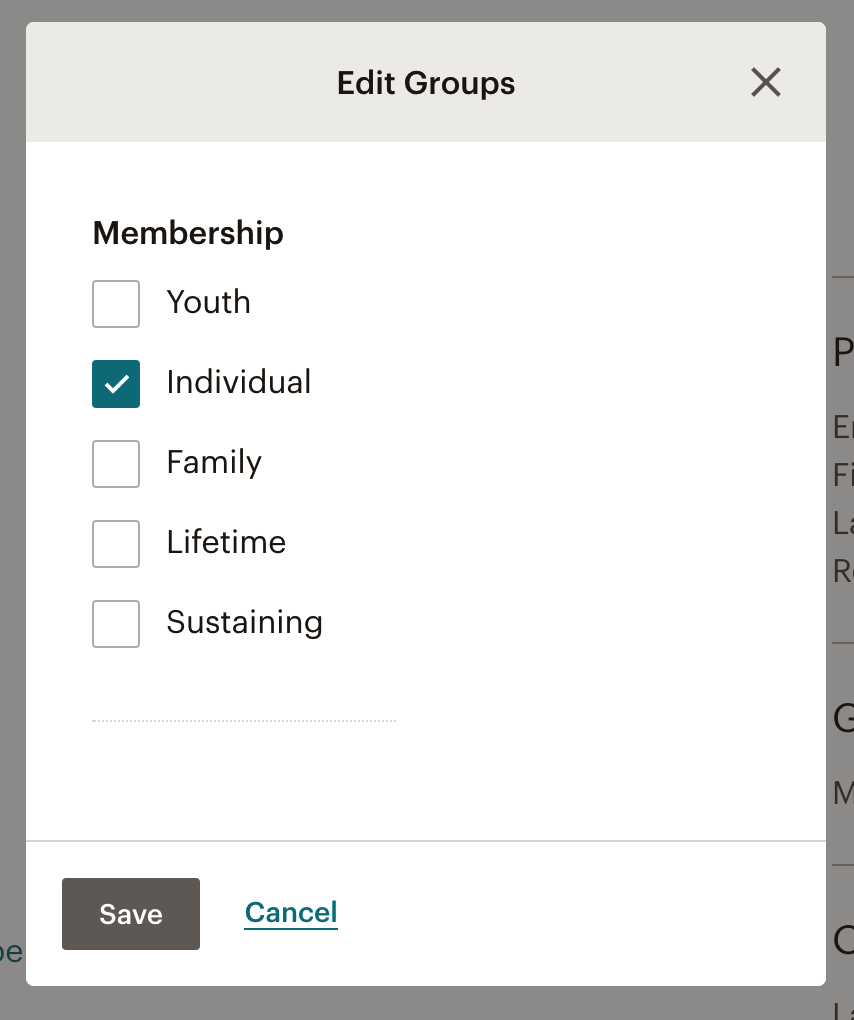
April 1, 2021 at 11:00 pm in reply to: Possible bug? Mailchimp does not re-tag member when manually removed #22389ParticipantOn a subscriber’s profile, once they expire, we are forced to manually uncheck the box that identifies this subscriber as a Member. In Mailchimp, we have a group called “Membership” and all the different levels: Youth, Individual, Family, etc.
When a *new* (not renewing or expired) member signs up, they are automatically added to Mailchimp and the correct Group Identifier (Individual, Family, etc) is “checked” on their profile.
 September 20, 2020 at 3:13 am in reply to: Send broadcast messages to members through WP Dashboard #20922Participant
Yes, we’ve had that box checked ever since we installed the Mailchimp addon, yet it’s never worked or removed anyone, so I’d say it needs complete development. Can anyone verify it actually works?
Additional email options through the paid addon would be great. Thanks!
September 18, 2020 at 10:27 pm in reply to: Send broadcast messages to members through WP Dashboard #20920ParticipantThanks – yes, we are currently using the Broadcast addon, though that only focuses on expiration-related emails. We’d like the ability to send regular emails to members and we’d prefer to have an always up-to-date email list; as I mentioned in the OP, expired members are not being removed from our list.
Is there another way to target only active SWPM members? Either though a third-party plugin you’re aware of, or can this be automated through Zapier between WordPress or SWPM and Mailchimp or another email provider?
ParticipantFantastic, thank you!
ParticipantAny thoughts on if this adjustment could be incorporated into a future update of the plugin?
ParticipantTo be honest, I’m not that advanced of a developer to answer the question. I merely looked at the existing code and saw a possible “gap” and tried a solution, which appears to work. If the plugin itself can be updated, then a hook or filter would be unnecessary.
In the class.swpm-members.php file, I added the following line which did not exist before.
'subscription_starts' => array( 'subscription_starts', false ),in
function get_sortable_columns() {
		return array(
			'member_id'     => array( 'member_id', true ), //True means already sorted
			'user_name'     => array( 'user_name', false ),
			'first_name'    => array( 'first_name', false ),
			'last_name'     => array( 'last_name', false ),
			'email'         => array( 'email', false ),
			'alias'         => array( 'alias', false ),
			'subscription_starts' => array( 'subscription_starts', false ),
			'account_state' => array( 'account_state', false ),
			'last_accessed' => array( 'last_accessed', false ),
		);
	}
The “Access Starts” was included in get_columns() but not get_sortable_columns().
As mentioned, if this can simply be added to the plugin for the next update, that would be perfect. Otherwise, if you can instruct what we would need to do to preserve this change, that would be great. From my research, it appears it would involve a hook or filter, but I don’t know more than this. Thank you!
December 26, 2019 at 8:57 pm in reply to: Manually adding Subscriber ID for PayPal Memberships *prior* to SWPM? #19527ParticipantYes, I believe that does clarify things and it makes sense regarding when manual adjustments may be required. We’ll leave the legacy memberships as-is for now and it sounds like things should function how we would want. Thank you!
December 24, 2019 at 7:50 am in reply to: Manually adding Subscriber ID for PayPal Memberships *prior* to SWPM? #19516ParticipantI do understand what you’re recommending, and thank you for the response.
Just to clarify: there was *no* previous membership plugin. We were accepting PayPal subscriptions by creating the subscription/button in PayPal’s dashboard directly, so there would be no re-routing of data from one plugin to another.
Are you stating, though, that the existing subscription (created in PayPal, prior to SWPM) *will* satisfy renewal requirements for SWPM? Thank you!
-
AuthorPosts