Simple Membership Plugin › Forums › Simple Membership Plugin › Bulk member import
- This topic has 9 replies, 4 voices, and was last updated 5 years, 4 months ago by
Marco.
-
AuthorPosts
-
April 23, 2021 at 10:06 am #22476
edevys
ParticipantHi,
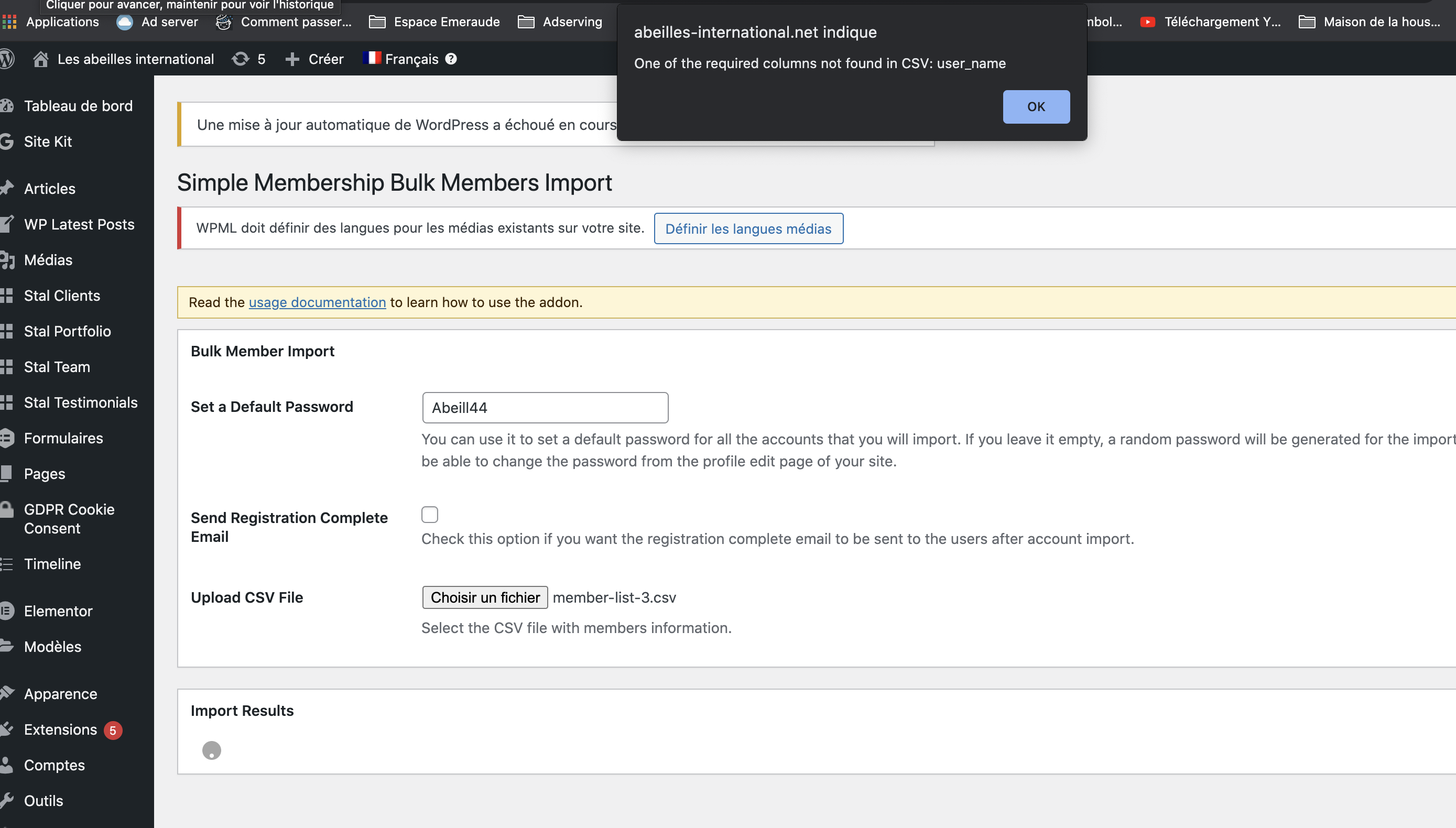
I have a problem with the bulk import functionnality. When I want to import my file, I have an error message with :
One of the required columns not found in CSV: user_nameBut in fact the user_name is my first column and all the fields are filled with a user name.
I cannot import my file. Can you help ?
Thank you
Emmanuel
April 26, 2021 at 12:28 am #22477mbrsolution
ModeratorHi, did you follow these instructions?
https://simple-membership-plugin.com/simple-membership-bulk-import-member-data-csv-file/Thank you
April 26, 2021 at 8:00 am #22479ParticipantYes I did but I still have an error when importing the file. It says that the first column is missing but it is not missing !
April 26, 2021 at 12:40 pm #22480ModeratorHi,
For testing purposes, what happens when you import the sample data in the csv template file?
Thank you
April 26, 2021 at 12:46 pm #22481ParticipantHi thank you for your reply.
I download the data CSV sample data file and put my data in it with the same column organization but when I try to import it on my website, I get a popup message : One of the required columns not found in CSV: user_name
For testing purpose I tried also with your sample data sheet without modifying them and I get the same message.
Emmanuel
April 27, 2021 at 1:59 am #22484ModeratorHi,
When you are creating a CSV file using Microsoft Excel for example; if the following CSV (Comma Delimited) format does not work, try CSV (MS-DOS) format.
Let me know if the above helps.
Thank you
April 27, 2021 at 10:43 am #22486ParticipantHello, Sorry but Even with this format I get the same answer and alert.
Please find hereby a screenshot
https://www.abeilles-international.net/images/simple-membership-import.png
It looks like the first column is not recognized.
Emmanuel
April 29, 2021 at 7:42 am #22507ParticipantHI, Could you help ? I am still running a problem !
Thank you.May 5, 2021 at 4:12 am #22524South_Coaster
Participant@edevys – I had the same problem.
My version of Excel has three output options for CSV export, only one works:
CSV UTF 8 (Comma Delimited) = NO
CSV (Comma Delimited) = NO
CSV (MS DOS) = YESJune 22, 2021 at 9:22 am #22725Marco
ParticipantI had the same issue. All three type, that @South_Coaster mentioned, didn’t work. So I opened the CSV file from Excel (MS-DOS) in TextEdit and replaced all semicolons with commas. After that, it worked but not with all files.
Is there already a solution for that issue that works in all cases?
-
AuthorPosts
- You must be logged in to reply to this topic.