If you wish for WP Users of differing roles (other then your admin) to be able to see your Simple Membership menus from the WordPress dashboard, there is an option in the advanced settings menu that you can use. This option is useful if you are employing someone to help with your company and need to give them access without allowing them to edit additional plugins/settings.
Providing a WP User with Simple Membership Admin Permission
- Click on the ‘WP Membership‘ menu.
- Click on ‘Settings‘ and then choose the ‘Advanced Settings‘ tab.
- Scroll down until you find a drop-down menu with the title: ‘Admin Dashboard Access Permission‘.
- By default only admin users will be able to see the Simple Membership plugin. You can alter this by choosing another option from the drop-down menu (see user options below).
- Once you have chosen the additional user roles that should have admin access, make sure you ‘Save Changes‘.
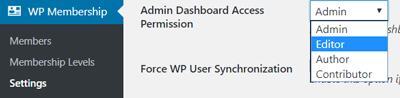
What are the Role Choices?
You can leave the drop-down menu as Admin. This will mean only users with the admin role will be able to access your Simple Membership menus.
If you choose Editor, your editors and admin will have access.
If you wish for your Authors to have access this will mean that the authors, editors and admins will be able to view the Simple Membership menus.
If you choose Contributor from the drop-down menu, all your contributors, authors, editors and admin will have access.