A teaser is a brief snippet of content designed to engage users and entice them to explore further. By offering just enough information to spark curiosity, teaser content effectively encourages visitors to continue reading or viewing the full content.
Utilizing teaser content is an excellent strategy for converting casual visitors into engaged members.
You can easily create teaser content with simple membership plugin by using the “More Tag Protection” feature.
Table of Contents
- How to Create Teaser Content
- Adding “More Tags” to Your Posts
- Content Visibility with the “More Tag”
- A Note About the “Read More” Link
- Troubleshooting “More Tag” Protection
- Alternative Method of Creating Teaser Content
How to Create Teaser Content
To easily create teaser content using the “More Tag Protection” feature, follow these steps:
- Navigate to the settings menu of the Simple Membership plugin.
- Locate and enable the “Enable More Tag Protection” option.
- Save your settings.
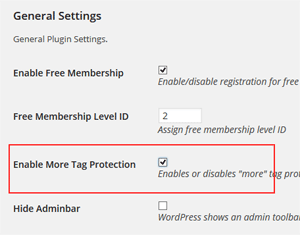
By enabling this feature, your content will be partially hidden behind a “More” tag, prompting visitors to sign up or log in to view the full content.
Adding “More Tags” to Your Posts
To create teaser content within your protected posts, you need to insert a “More Tag” marker at the desired location. This will define the point where the content is cut off, encouraging users to take further action to view the rest.
Steps to Insert a “More Tag”
- Open the post you want to protect and add teaser content to.
- Place the cursor at the point where you want to insert the “More Tag.”
- Insert the “More Tag” marker.
Refer to the screenshot below for examples.
Example: Using the Block Editor

Example: Using the Classic Editor

Content Visibility with the “More Tag”
When you use the “More Tag,” any content placed after the marker remains protected, accessible only to members with the appropriate access level. Content placed before the “More Tag” serves as teaser content, visible to all visitors.

A Note About the “Read More” Link
Please be aware that the “Read More” link block differs from the standard “More” tag block. The teaser content functionality described on this page does not apply to the “Read More” link.

Troubleshooting “More Tag” Protection
If the “More Tag” protection isn’t working as expected, ensure that content protection is enabled for the specific post. The “More Tag” feature only functions on posts where content protection has been properly applied.
To verify this:
- Edit the post in question.
- Scroll down to the “Simple Membership Content Protection” section at the bottom of the post editor.
- Confirm that content protection is enabled for the post.
Alternative Method of Creating Teaser Content
The partial/section protection shortcode can be used to create teaser content also.