The Auto-Fill Contact Form addon allows you to automatically fill in the logged-in user’s name and email address in your contact forms.
Currently, the addon supports Contact Form 7 plugin. If you’re using a different contact form plugin that offers similar hooks or filters, support for it can be added as well.
Table of Contents
- Auto-Fill Example
- Download the Auto-Fill Contact Form Addon
- Install the Addon
- Using the Auto-Fill Addon
- Want to Add Support for a Different Plugin?
- Want to Auto-Fill Other Custom Fields?
- Explore All Addons/Extensions
Auto-Fill Example
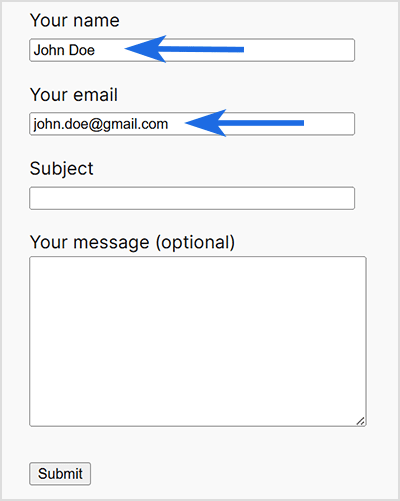
The screenshot below shows an example of a Contact Form 7 form with the name and email fields automatically pre-filled.
Download the Auto-Fill Contact Form Addon
Download the free Simple Membership Auto-Fill Contact Form addon.
Install the Addon
- Click on the Add New menu under the plugins interface.
- Go to the Uploader tab and upload the swpm-auto-fill-contact-form.zip file.
- Hit the Install Now button and then activate the addon.
Using the Auto-Fill Addon
This addon leverages the built-in hooks provided by the following plugin(s) to automatically fill in the logged-in user’s name and email address on their contact forms:
- Contact Form 7
Just keep this addon active to get the effect.
Want to Add Support for a Different Plugin?
If you’d like support for a different contact form plugin to be added to this addon, please provide us with the following information:
A link to the plugin’s documentation that outlines the appropriate hook or filter we can use to auto-fill the name and email fields.
You’re also welcome to share the source code of this free addon with the contact form plugin’s developer as a reference. This can help them understand the integration approach and suggest the correct hook to use.
Want to Auto-Fill Other Custom Fields?
If your contact form includes custom fields beyond name and email — such as phone number, address, or user meta data — and you’d like those to be auto-filled as well, this can be done with custom development.
These advanced use cases require developer intervention, as each form plugin handles custom fields differently. You’re welcome to hire a professional developer, or you can contact us for a quote and we’ll try to assist you.
Explore All Addons/Extensions
To view all available addons for the Simple Membership plugin, visit the Addons Page.