The Simple Membership plugin allows you to configure annual memberships that expire on a fixed date every year. This is useful for scenarios such as:
- Calendar-year memberships (e.g. January 1 → December 31)
- Fiscal-year memberships (e.g. July 1 → June 30)
- Any membership model where access resets on the same date every year
This feature is configured at the membership level and applies to all members who belong to that level.
Table of Contents
- How Annual Memberships Work
- Where to Configure This Option
- Example Scenarios
- Important Notes
- When to Use Annual Memberships
- Related Documentation
How Annual Memberships Work
Annual memberships introduce a new way to handle access duration in the plugin. Instead of fixed durations (like 1 year from signup) or rolling renewals, this option ties expiration to a specific date each year. Here’s a breakdown:
- Annual Expiration Date: You specify a month and day (e.g., December 31). All memberships in this level will expire on this date annually, regardless of when the member joined—unless modified by the minimum period setting.
- Minimum Period of Days (Optional): This acts as a grace period for new signups. If left empty (the default), every member’s access expires on the set annual date, even if they joined just days before. If you enter a value (e.g., 90 days), the plugin checks the time remaining until the next expiration:
- If a user signs up with more than or equal to the minimum days left, their membership expires on the upcoming annual date.
- If they sign up with fewer than the minimum days left, their membership is extended to the following year’s expiration date. This ensures they get at least the minimum period of access.
Where to Configure This Option
- Go to Simple Membership → Membership Levels
- Edit an existing membership level or create a new one
- Locate the Access Duration field
- Select the Annual Expiration option
- Configure the Annual Expiration Date and the optional Minimum Grace Period (in days). See the details below for how these settings work.
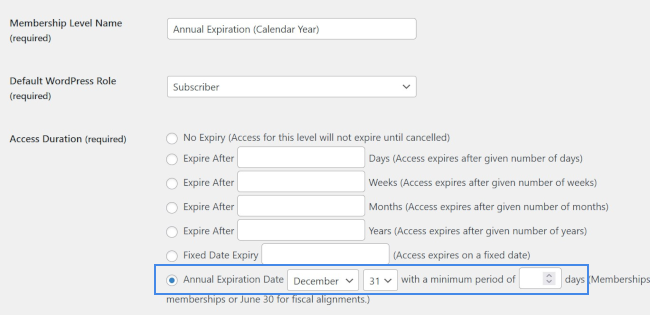
Annual Expiration Date
Field: Annual Expiration Date
This setting defines the month and day when memberships in this level will expire every year.
Examples:
- December 31 → Calendar-year membership
- June 30 → Fiscal-year membership
- March 31 → Custom annual cycle
All memberships assigned to this level will expire on this date each year, subject to the “Minimum Period of Days” rule explained below.
Minimum Period of Days (Grace Period)(Optional)
Field: Minimum Period of Days
This field is optional and is used to prevent users from receiving an unreasonably short membership period if they sign up close to the annual expiration date.
How it Works
- If this field is left empty
→ Everyone’s membership expires on the next occurrence of the annual expiration date, regardless of when they join. - If a value is entered (for example: 90)
→ The plugin checks how many days remain until the annual expiration date at the time of signup.- If there are 90 days or more remaining, the membership expires on the current year’s expiration date.
- If there are less than 90 days remaining, the membership expires on the following year’s expiration date.
This ensures new members always receive a minimum access period.
Example Scenarios
Example 1: Calendar-Year Membership (No Minimum Days)
Settings:
- Annual Expiration Date: December 31
- Minimum Period of Days: (empty)
Outcome:
- A user who joins on January 5 expires on December 31 (same year)
- A user who joins on November 20 also expires on December 31 (same year)
This setup is best when you strictly want memberships tied to the calendar year, regardless of signup date.
Example 2: Calendar-Year Membership with Grace Period
Settings:
- Annual Expiration Date: December 31
- Minimum Period of Days: 90
Outcome:
- User joins on August 1 (more than 90 days left)
→ Expires on December 31 (same year) - User joins on October 15 (less than 90 days left)
→ Expires on December 31 (next year)
This setup is ideal when you want to avoid selling a very short membership near the end of the year.
Important Notes
- This feature applies per membership level
- The expiration logic is calculated at the time the membership is activated
- The annual expiration date repeats automatically every year
- You do not need to manually adjust expiry dates for individual members
When to Use Annual Memberships
Annual memberships are recommended when:
- All members should renew at the same time
- You want predictable renewal cycles
- You run an organization, club, or program with yearly terms
Related Documentation
Please refer to the Membership Levels documentation for details on all other configuration options.